Omni search
One search covers everything a tabverse holds: tab titles and urls, history (closed tabs), notes, todos and bookmarks.
The basic search box over the saved tabverse list is documented in Tabverses. This page is the full view and the server-backed index.
Where the search runs
- Without a server, the search scans the data stored in this browser.
- With a server paired, the search uses the server's full text index, which knows every tabverse of the account - including ones this browser has not downloaded yet. If the server cannot be reached, the search falls back to the local scan automatically.
Reading the results
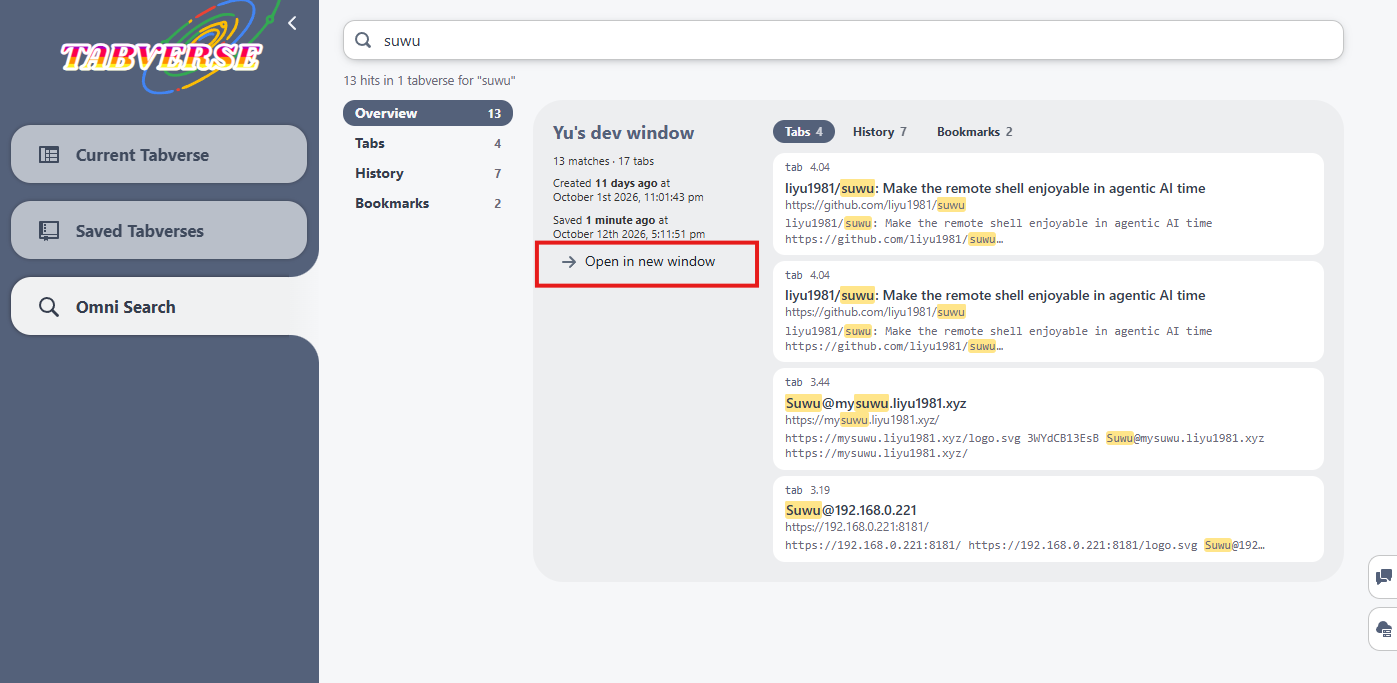
Results are catalogued by tabverse, not listed as loose records:
- the first tab, Overview, ranks tabverses by how many records of any kind matched;
- Tabs, History, Notes, Todos and Bookmarks each rank tabverses by how many of that kind matched.
Inside a tabverse the matched records are listed with the terms you typed highlighted. Opening a result loads the tabverse it belongs to.
Omni Search
When a server is paired, the left sidebar gets an Omni Search entry. It is the same unified search as a full view: a query box, the kind tabs, and one card per matched tabverse, each with a button to open that tabverse in a new window.
The server's console offers the same search to an operator looking at an account.