Server Console Usage
Every tabversed server serves a small web console at /console. It is the web
UI of the deployment: the sync server's account
and data surface. It is also where you mint the pairing code a browser needs.
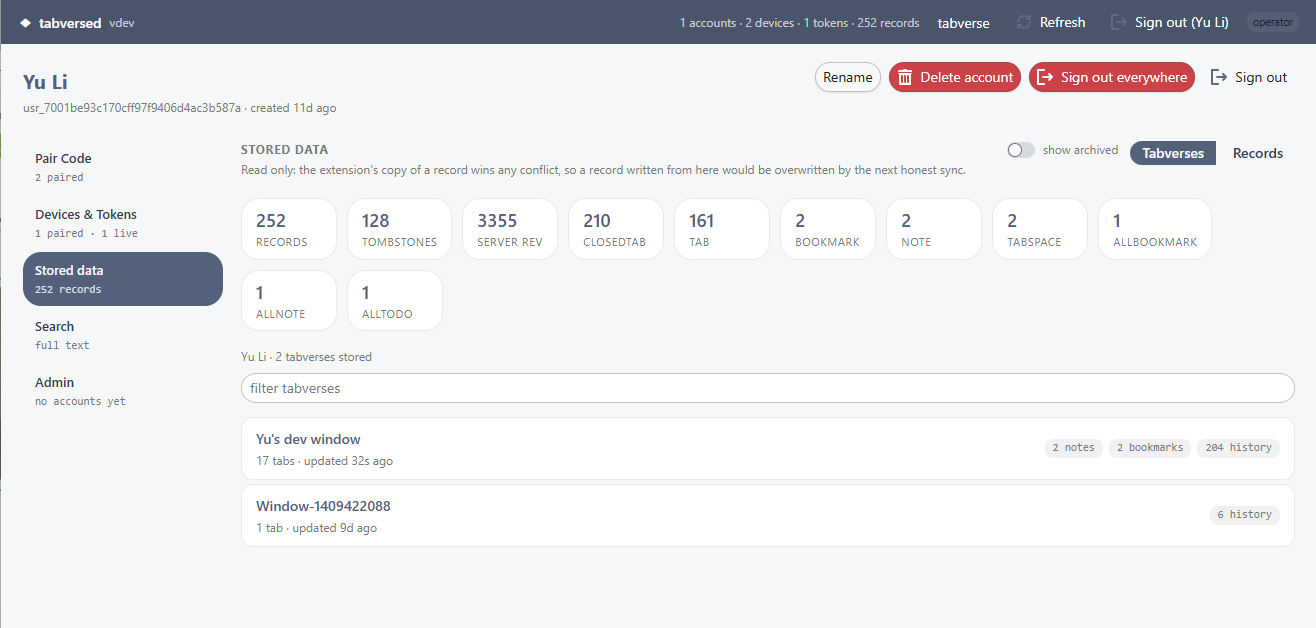
For a signed-in account
The rail on the left is the account, section by section:
- Pair Code - mint a single-use code to pair another browser, with a lifetime you choose. Copy it together with the server URL into the extension's sync dialog.
- Devices & Tokens - see every paired device and when it was last seen, and revoke a lost one. Revoking a token cuts that device off; it has to pair again.
- Stored data - the account's tabverses and raw records, read only. The counters at the top count records by entity; clicking a tabverse opens the same read-only view the extension draws. A record written from the console would lose the next sync conflict, so it does not offer to write one.
- Search - full text search over the account's own records.
An operator also gets a separate Admin page at /console/admin, reached
from a button in the header next to tabverse (see below).
Sign-in is a single-use link emailed to you, or GitHub / Google if the operator enabled it. Signing in and creating an account are two steps (ADR 0029): the first time, following the link or the provider lands on a Create your account page, which records the address and your agreement to the user agreement, and the account exists after that. On an invite-only server the page also asks for an invitation code - an invitation link from the operator fills that in - and an address with no code can request one there. "Sign out everywhere" ends every browser session on the account; paired devices keep syncing, because their tokens are a different credential.
For an operator
The account matching the server's TABVERSED_ADMIN_EMAIL is the operator.
Operators see the directory of accounts and can, for any account:
- rename it, change its role, or delete it (which removes its data - there is no undo);
- mint a pairing code, revoke a device or token, and archive a dead one;
- impersonate it: a read-only, time-limited, logged view for answering support questions. It cannot change anything, and every session started this way is recorded in the audit log.
Archiving is not deleting. Archiving a token, a device, or the records a device wrote only hides them from the console's default views; the rows stay stored and keep syncing to the user's own devices, and it is reversible. The only real removal is deleting the account.
Next
- Self-host a server - run the server this console belongs to.