Self-host a server
Tabverse is local first; a server is optional. If you want the same tabverses on
more than one browser, run tabversed yourself. It is a single Go program
with an SQLite data directory - no external database, no cloud dependency - and
it is the only server the extension will talk to.
This page is the practical path. The server README is the complete reference: every setting, the protocol semantics, the account model and the API.
What you need
- A machine that can run a Go binary - Linux
amd64orarm64(the build is CGO-free), or build from source anywhere Go runs. - A way for the browser to reach it: an address on your LAN
(
http://192.168.0.221:8223) or a public HTTPS origin (https://tabs.example.com). - Optionally, an SMTP host, so sign-in links can be emailed. Without one the link is printed to the server log, which is fine for a LAN.
Quick start (from source)
pnpm install
pnpm run ui:build        # build the console, embedded into the binary
pnpm run server:dev      # listens on 0.0.0.0:8223, db ./server/data/tabversed.db
Then:
-
Open
http://localhost:8223/consoleand sign in - with a provider, or by typing your address and following the link it emails (printed to the server log if no SMTP is set). Signing in proves who you are; the Create your account page that follows records the address and your agreement, and then the account exists. The first account registered withTABVERSED_ADMIN_EMAILbecomes the operator. -
In the console's Pair Code tab, mint a single-use code.
-
In the extension, open Settings ▸ Sync ▸ Setup ▸ Custom server and pair with the server URL (the address the browser can reach it at) and that code:
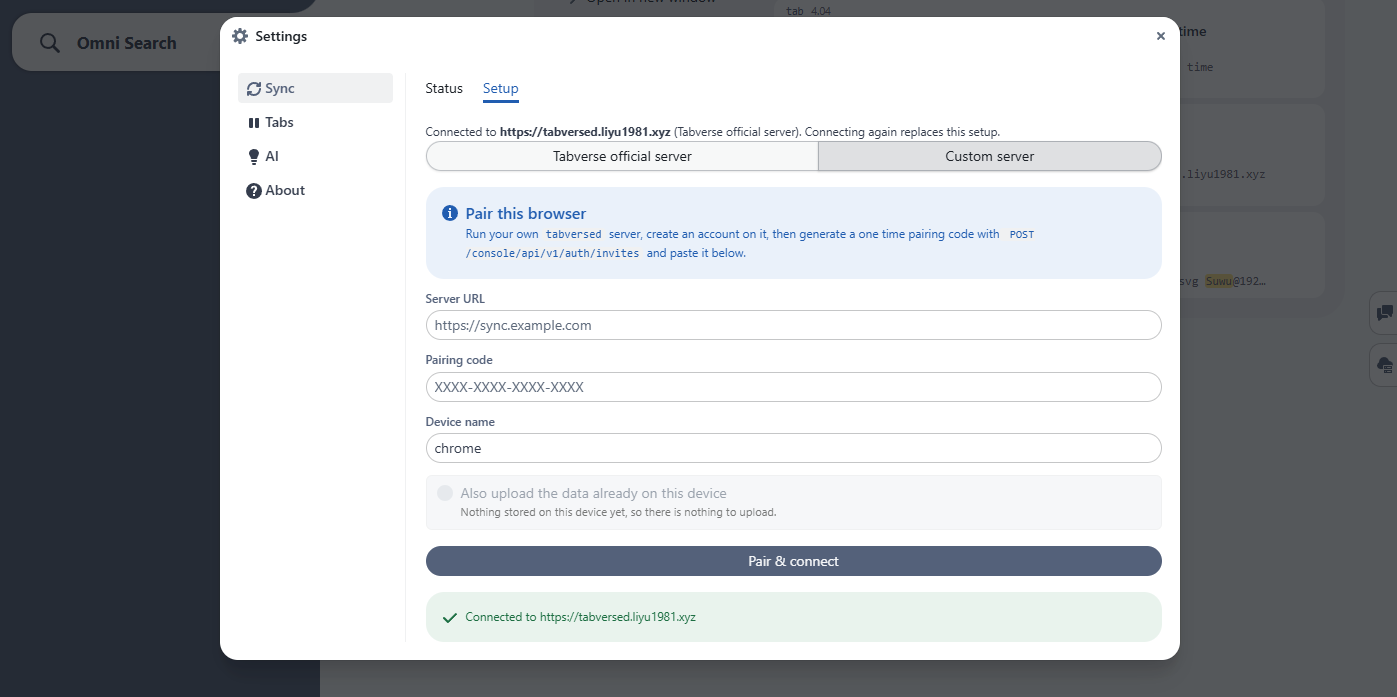
The extension may talk to any http/https server (adr/0010); a device token
is a bearer credential, so prefer https:// or a trusted network.
Run it as a service
pnpm run server:build                 # -> server/bin/tabversed (builds the console first)
install -Dm755 server/bin/tabversed ~/.local/bin/tabversed
tabversed config --dir ~/.tabversed   # write a .env where the service will look
tabversed service install             # a systemd *user* unit, no root
loginctl enable-linger $USER          # optional: keep running when logged out
tabversed service start
tabversed service logs                # follows the journal
tabversed service manages a systemctl --user unit at
~/.config/systemd/user/tabversed.service, running ~/.local/bin/tabversed serve with its working directory at ~/.tabversed (where it reads .env from,
and where the database lands by default). Replacing that binary is the upgrade.
A Docker image is built by pnpm run server:docker:
docker run -p 8223:8223 -v tvdata:/data tabversed
Configuration
Settings come from the environment or from a .env file next to the binary
(the environment wins). tabversed config writes a filled-in template. The ones
worth setting on a real deployment:
| Variable | Default | Meaning |
|---|---|---|
TABVERSED_ADDR | 0.0.0.0:8223 | listen address; use 127.0.0.1:8223 to stay local |
TABVERSED_PUBLIC_URL | (unset) | the origin the deployment is reached at; used for sign-in links and social callbacks |
TABVERSED_ADMIN_EMAIL | (unset) | whose first registration becomes the operator |
TABVERSED_REGISTRATION_REQUIRES_INVITE | false | make registration invite-only: invite addresses from the console's Admin page (/console/admin). The admin address is always exempt |
TABVERSED_EMAIL_REGISTRATION | true (official build: false) | the passwordless email path; 0 means social logins only |
TABVERSED_SMTP_HOST / _FROM | (none) | where sign-in links are sent |
TABVERSED_RESEND_API_KEY / _FROM | (none) | send through Resend (an HTTP email API) instead; preferred over SMTP when set |
TABVERSED_SECURE_COOKIES | true | turn off only for plain http on a trusted LAN |
TABVERSED_DB | data/tabversed.db | central SQLite file (accounts, devices, tokens) |
TABVERSED_USERS_DIR | users/ beside it | per-account content databases (adr/0027) |
TABVERSED_MAX_OPEN_USER_DBS | 64 | cap on simultaneously open content files (the file-descriptor budget) |
TABVERSED_RETENTION_DAYS | 14 | prune old session snapshots (0 keeps forever) |
TABVERSED_FRAME_ANCESTORS | chrome-extension: | who may embed the console in an iframe; the default admits browser extensions only |
The full table - plus TABVERSED_MAX_RECORD_BYTES,
TABVERSED_SYNC_BATCH_LIMIT, TABVERSED_SEARCH_LIMIT,
TABVERSED_WS_ORIGINS, the session TTLs and the social provider keys - is in
the server README.
Who may register
By default anybody who can reach the server can create an account, but signing in and creating the account are two steps (ADR 0029). A social provider, or the emailed sign-in link, proves who the person is; a Create your account page then asks for the email (required) and their agreement to the user agreement. Nothing creates an account silently, so a session that outlives its account - a deleted one, or a database restored from before it existed - is sent back to that page instead of recreating a user.
Two settings gate registration:
TABVERSED_REGISTRATION_REQUIRES_INVITE=1makes it invite-only: the register page then requires an invitation code. Invite addresses from the console's Admin ▸ Registration invites section. Every invitation carries a code, the message names it, and it also carries a link that opens the console with the address and the code already filled in. Nothing sends mail on its own: opening an invitation shows the drafted message to copy, and an explicit Send with Resend button sends that same message. A person with no code can request an invitation on the register page: that creates a pending request the operator sees in the console, and the requester's next sign-in shows a waiting notice instead of the console. Approving a request mints the invitation and drops the request; the person then registers with the code like anybody else - the code is never skipped. The admin address is exempt from the code, so the operator can always register first.TABVERSED_EMAIL_REGISTRATION=0turns the passwordless email path off and leaves social logins only. The official build defaults to this.
TLS
Serve it behind a reverse proxy (Caddy, nginx, or a tunnel) that terminates
TLS, and set TABVERSED_PUBLIC_URL to the public origin. The console sets
Secure cookies and HSTS on that basis; TABVERSED_REQUIRE_HTTPS=true makes
the server refuse to start when the console is served over plain http on a
non-loopback address. Plain http on a LAN works (set
TABVERSED_SECURE_COOKIES=false), but the device token is then readable by
anything on that network.
Becoming the operator
Set TABVERSED_ADMIN_EMAIL to your address before you register, and the
account that matches becomes the operator on first registration - no token, no
code. If the address already has an account, the next start promotes it. Once an
operator exists the variable grants nothing, so leaving it set is harmless.
The operator gets a separate Admin page at /console/admin (a button in the
header), with the accounts, Impersonate, role changes, and the registration
invites. See the Server Console.
Next
- Server Console - what the console offers once it is running.
- Sync with a server - the extension side of pairing.